DNS Diff View
Something breaks. The first question is always “what changed?”
With BackupMyDNS, you don’t search through audit logs or ask around on Slack. You open the diff view and see the answer in seconds.
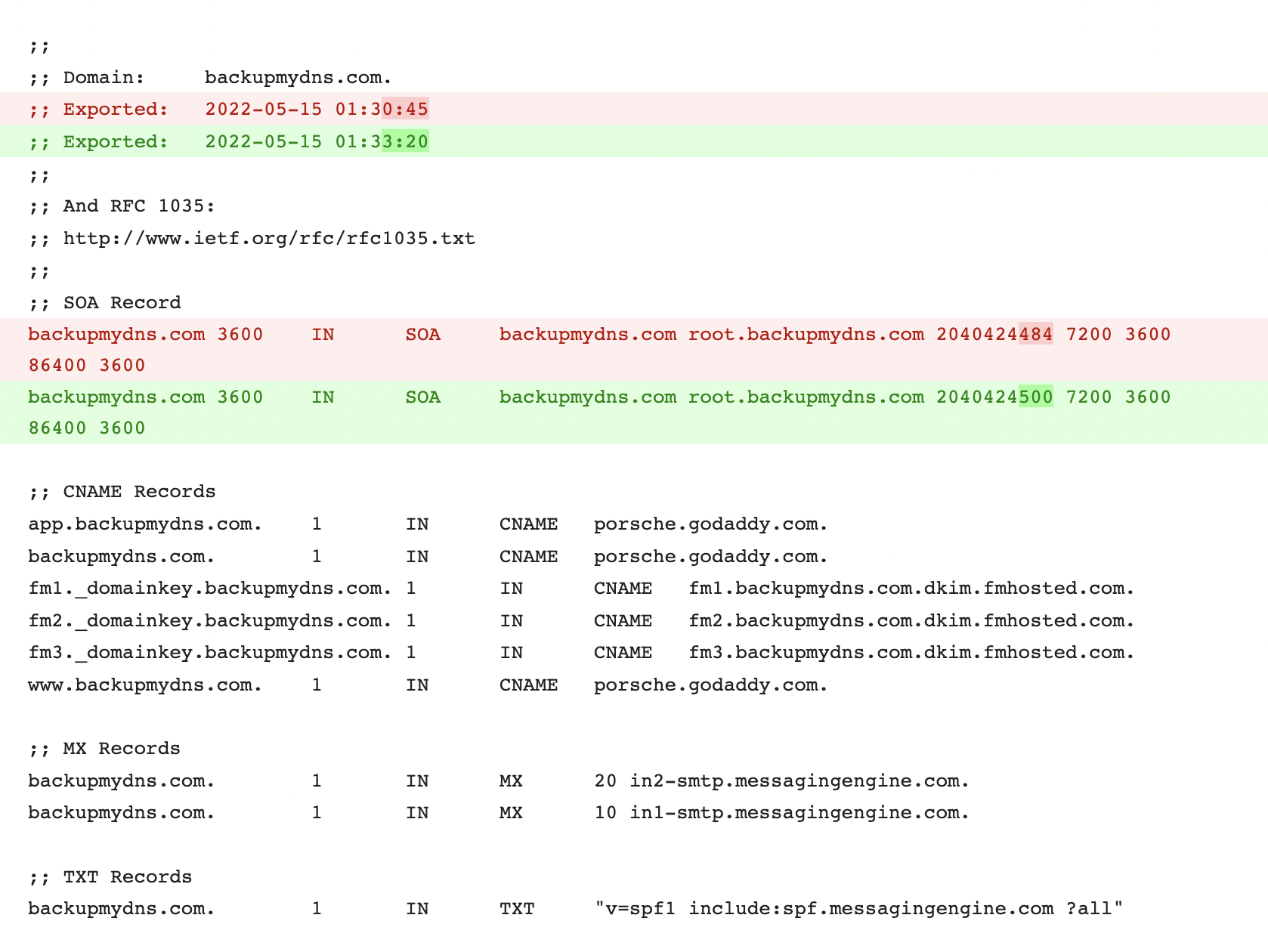
How diffs work
Every time we detect a change in your zone, we capture a full snapshot. That snapshot is compared against the previous one, and the diff is computed and stored.
Added records are highlighted. Removed records are highlighted. Modified records show the old and new values side by side. It works like git diff for your DNS — green for additions, red for removals, with changes within modified records clearly marked.
The diff is computed at the record level. If an A record’s IP changed, you see the old IP and the new IP. If a TXT record’s value was modified, you see both versions — character by character. This matters for records like DKIM keys, where a single wrong character breaks email authentication and the difference is invisible at a glance.
Compare any two snapshots
You’re not limited to consecutive diffs. Pick any two snapshots from your timeline and compare them directly.
This is useful when you need to understand how a zone evolved over time. Maybe you want to compare the current state against what the zone looked like three months ago, before a migration. Maybe you want to see every change that happened during a specific maintenance window by comparing the snapshot before and after.
Jump back days, weeks, or months. As long as the snapshots are within your retention period, you can diff them.
Every record type
The diff covers every record type your provider API returns:
A · AAAA · CNAME · MX · TXT · SRV · NS · CAA · SOA — and any other type the provider exposes.
This includes the records where diffs matter most: long TXT values like DKIM keys and SPF records, MX records where priority changes break mail routing, and SRV records where a port or weight change redirects traffic.
Use cases
Incident response. Your site is down. You open BackupMyDNS, look at the latest diff, and see that a CNAME was changed 20 minutes ago. You have the old value right there. Time to resolution: minutes instead of hours.
Migration verification. You moved 200 records from one provider to another. Pull up the diff between the last snapshot at the old provider and the first snapshot at the new one. Every record that didn’t transfer correctly is immediately visible.
Audit trail. Your compliance team needs to know what DNS changes were made in Q3. Filter by date range, review the diffs, and you have a complete record of every modification with timestamps.
Rollback reference. Something changed and you need to undo it, but you’re not sure what the old value was. The diff shows both states. Copy the old value and restore it at your provider.
More than a backup
Diffs turn static backups into operational intelligence. A zone file backup tells you what your DNS looks like right now. A diff history tells you the story of how it got there — and gives you the information you need to fix it when something goes wrong.
Most teams don’t discover the value of diffs until the first incident. After that, it becomes the feature they use most.
Free for your first domain. No credit card required.